

Phone is still the channel customers reach for when something has gone wrong, and it is still the most expensive one to staff.
Voice automation is the use of AI and telephony technology to handle customer phone calls without a person in the loop. It resolves routine inquiries end to end, shortens wait times, and reduces contact center cost, while the calls that genuinely need a person still get one.
But you cannot port your messaging conversation design straight onto the phone. Callers have less patience, capturing information is harder, there are more ways for a conversation to go sideways, and the people calling are often not the people who message. Thoughtful design accounts for all of that.
Here are the five practices we teach our own customers, and one thing to settle before you start.
- Define your caller persona. Understand who calls you and design for them, not for your messaging audience.
- Craft an inviting greeting. Open in a way that tells callers what is happening and what they can ask for.
- Write right. Keep it brief and clear, because a caller's attention is split.
- Pause strategically. Match the pause to the task, and say something useful when it times out.
- Hand off at the right time. Know when a person should take the call.
Know which number you are managing
Settle this before the rest, because it decides whether any of it gets better.
Containment counts conversations that didn't require a human. Resolution counts customers who got what they came for. They're not the same measure, and a voice program can improve one while the other gets worse. A caller who gave up and hung up is contained.
Branch retired containment as their headline metric in favor of automated resolution. Their reasoning is the whole argument in one line: a caller who never reached a human is not the same as a caller whose problem was solved.
If the number on your weekly report is containment, it can improve for a year while your callers have a worse time, and the report will look fine throughout. Get the definition in writing before you set a target against it:
1. Define your caller persona
The caller persona is the profile of the person picking up the phone. There's a good chance they are not the person you designed your messaging experience for.
Understanding them will guide the build and produce higher resolution rates. Ask:
- Will this caller be comfortable speaking with an automated voice assistant?
- Are they calling from a landline, and can they receive an SMS?
- Will they use dialects or terminology you need to account for in training? Some callers ask for escalation by saying "Operator", which is probably not a word anyone trained.
That last example is a category, not a curiosity. The words your callers use drift, and they drift faster than anyone updates for. A product gets renamed and callers keep using the old name. A policy changes and callers describe it in the words your help center used last quarter.
2. Craft an inviting greeting
The greeting is the opening message callers hear when they reach your voice number, or when an IVR transfers them. Getting it right invites people into the conversation instead of making them look for the exit.
- Tell the caller they're speaking with a conversational AI. You can also tell them how to speak to it, in complete sentences or short phrases.
- Notify the caller that the call is being recorded. Many jurisdictions require it, including under California's Invasion of Privacy Act.
- Account for "hello" interruptions. Callers say hello partway through a greeting far more often on the phone than in Messaging. A secondary greeting answer with variations of "hello" stops the original message repeating.
- Give clear instructions on what to do next. An open-ended "what can I help you with?" is jarring for some callers. Suggest the things you can actually help with.
- Prompt callers to give the AI agent a chance. Some callers, particularly older ones, will ask for a person immediately. Name your highest-volume drivers in the greeting so they know what they can get done here.
A "give it a shot" answer is worth building. Far more people ask for a person at the greeting on the phone than in Messaging, because most people who call are expecting one. Naming what the agent can handle earns their cooperation.
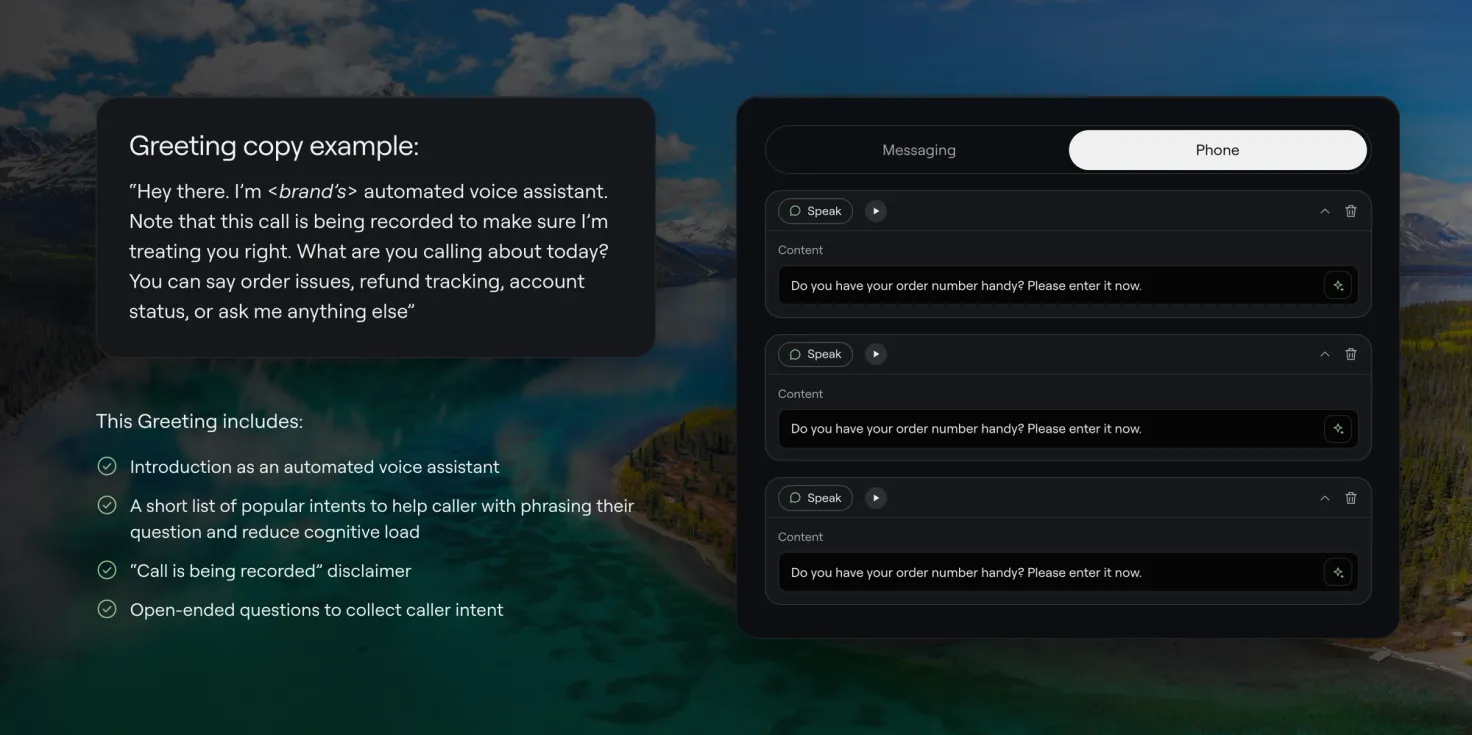
Greeting copy example: "Hi, I'm <brand>'s automated voice assistant. This call is recorded so we can make sure I'm treating you right. What are you calling about today? You can say order issues, refund tracking, or account status, or just ask me anything else."
That greeting does four things: it introduces the automated assistant, gives the recording notice, lists popular intents so the caller can phrase their question, and ends with an open question that collects intent.
3. Write right
Phone calls demand more attention than messaging does. Callers are either focused entirely on the call and want it over, or they're multitasking and you have a fraction of their attention. Either way, brevity and clarity are the job.
Keep the information succinct
Get to the point and let people ask for more. Shorten what you deliver and put a prompting question at the end.
- Before: You're all set! Your plan has been changed and you should see the changes in your account within two hours. We also have a promotion on data roaming. Would you like to hear more?
- After: You're set. You should see the changes in your account within two hours. Would you like to hear about our data roaming promotion?
Reduce cognitive load wherever possible
Cognitive load is the mental effort needed to process information during a conversation. Writing succinctly gets you most of the way. Three more things help.
Send heavy answers to another channel. Some answers contain information nobody can hold in their head, like an address or an order number. Send it to SMS instead, so the caller isn't hunting for a pen.
- Before: To exchange your item, go online to ourstore.com/returns and enter all of your information. Make sure you have a copy of your receipt and the purchase date on hand, as well as the reason for your exchange.
- After: You'll need to go through our returns portal online to exchange your item. I've just sent you an SMS with everything you need.
Don't offer too many options at once. If you're giving callers a choice, stick to three or four and offer to read more.
Make sure callers know how to navigate. People want to pause, slow down, and repeat what's read to them. Build those commands in, and tell callers the words that trigger them. However good your prompts are, callers will still get stuck in a state they can't get out of, and knowing the magic words is what rescues them.

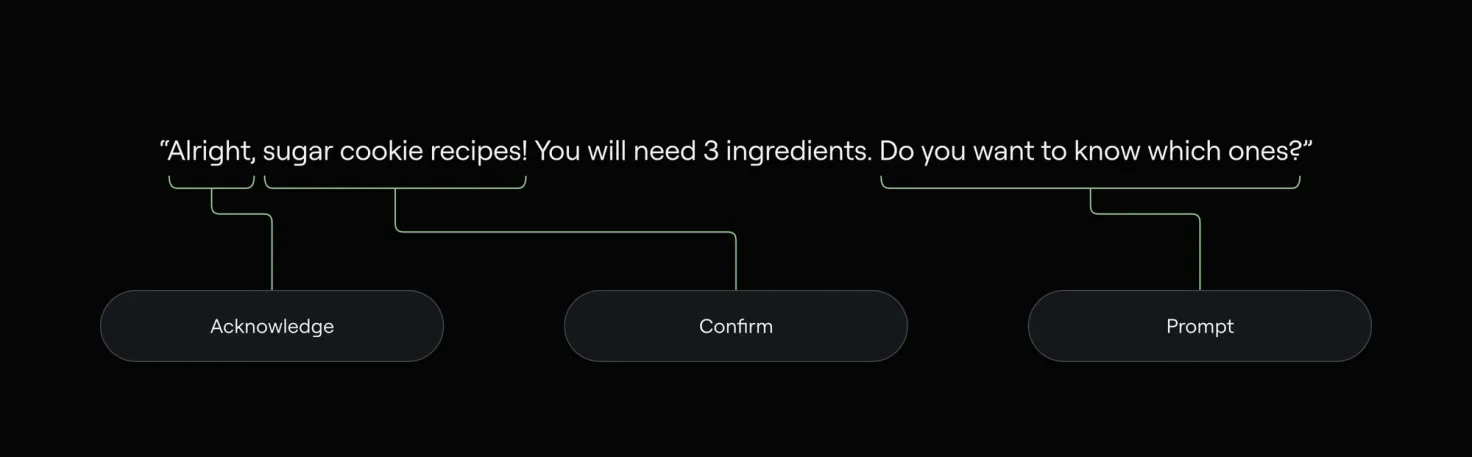
Follow acknowledge, confirm, prompt
This structure works on most channels. On the phone it's essential.
- Acknowledge lets callers know they were heard and it's the agent's turn to speak.
- Confirm lets callers know which answer they're in. If it's the wrong one, they can interrupt instead of sitting through it.
- Prompt keeps the conversation moving inside guardrails you control.
Ensure complete clarity in your prompts
When you prompt a caller, be exact about what you need and how to give it to you. The more specific the prompt, the stronger the build.
- Before: What is your date of birth?
- Better: Using a complete date, such as May 23rd, 1990, what is your date of birth?
- Best, spoken reply: Using a complete date, such as May 23, 1990, please tell me your date of birth.
- Best, dialpad input: Using your dialpad, enter your date of birth in year, month, date format. For example, May 23, 1990 would be 1 9 9 0 0 5 2 3.
Write sample dialogue before you build
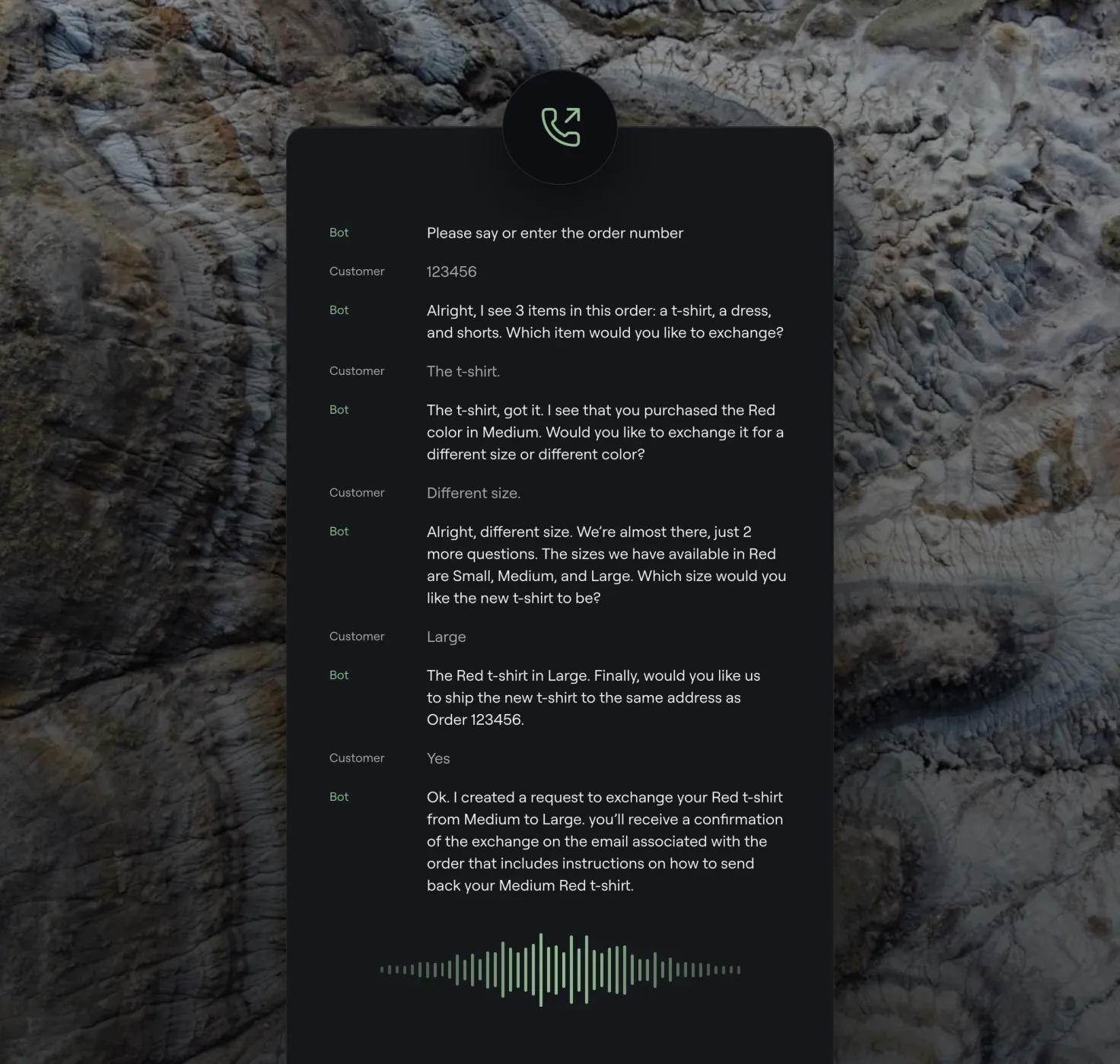
Seeing a use case played out as dialogue makes it obvious what information the happy path actually needs, and lets you flag those requirements during scoping rather than halfway through the build.
Then find someone to read it back and forth with you. It sounds silly. Hearing the intonation and the pace will show you things reading silently will not.
Use conversational markers
Words like "first", "almost there", and "finally" tell callers where they are and how much is left.
Write clear error messages
An error message should say what went wrong and how to retry.
- Before: Oops, something went wrong! Would you like to try again?
- After: I wasn't able to find an order associated with your phone number. Is 555-555-5555 the number you used to place your order?
Review and optimize
Refine the wording wherever you can, always toward brevity and clarity. If you've already built flows for Messaging, you can copy them over to Voice and adapt them rather than starting again. There are specifics for that at the end of this article.
4. Pause strategically
Automated voice conversations have to account for pauses, the same way live ones do. This matters most when you need information the caller may not have to hand.
Let the caller know a pause is coming. If you need an order or policy number, say "I'll give you a few seconds to find that before we start."
Plan when to time out. There's an average gap between a pause starting and a caller beginning to speak. If that passes in silence, prompt them and check they're still there.
Match the timeout to the task. The guidance that holds up is about matching the pause to what you asked for, not about picking a number.
- Longer, for grouped numbers. Callers reading a card or policy number pause naturally between groups. A short timeout cuts them off.
- Longer, for recall. Callers finding information or recounting what happened hesitate and restart.
- Shorter, for quick answers. When you've asked for a yes or a no, a short timeout keeps things moving.
Say something useful when it fires. "I didn't catch that" is a dead end. "I didn't catch that. Your account number is at the top of your statement, and you can say it, type it, or say I don't know it" gives the caller three ways out of the same corner.
You don't always need to time out. Silence is fine when there's another way forward, like a button in SMS, or when the lack of response doesn't break the conversation.
One thing to check on a schedule: whether your timeouts still match what you're actually asking for. The asks change as flows change, and the timeouts usually don't.
5. Hand off at the right time
With well-designed flows you'll resolve most inquiries automatically. Two cases should still go to a person.
- Repeating too often. If the conversation is looping, it isn't helping. The caller may have a genuinely unusual case, and the agent should hand off rather than try again.
- Business rules. Some inquiries belong with specific teams. Cancellation requests might go to a loyalty team, for example. Set those rules however makes sense for you.
Handoff rate is easy to measure and easy to misread. A team that drives it down by making escalation harder hasn't improved anything, and will find out from CSAT a quarter later. The measure worth watching is what the person on the other end receives. The caller shouldn't have to repeat what they've already said, the context should arrive with them, and the handoff should come when the conversation stopped being productive rather than three turns after.
What keeps working after launch
Everything above is how to build it. This is how to keep it.
A voice deployment rarely fails loudly. It degrades. The greeting still plays, the flows still run, the reporting still shows resolutions, and somewhere in the middle of that the calls stop going well. Nobody files a ticket, because the people who would are the callers, and they just hang up.
Four habits separate the deployments that hold up, and none of them are technical.
Listen to calls, on a schedule, forever. Listening is where every voice team starts, and it's the first thing to fall off the calendar once the launch settles. The failures that matter don't appear in aggregate: a timeout that fires half a second early, a prompt that made sense to the person who wrote it and nobody else, a confirmation step callers keep talking over. Each one shows up as a slightly lower resolution rate and nothing else. Put a fixed number of calls in someone's calendar every week, listened to end to end, by a person allowed to change what they hear.
Track resolution, not containment. Know the difference well enough to explain it to your CFO.
Own the vocabulary gap. Somebody should hold standing responsibility for the distance between what callers say and what your voice agent recognizes. Not a quarterly review. A job.
Revisit pauses and handoffs whenever the flows around them change. Those two age fastest.
None of that is exciting, and none of it makes a good launch announcement. It's the difference between a voice deployment that's still good in a year and one everybody quietly stopped trusting.
Voice automation compared with Messaging automation
- Attention. Voice: requires full or near-full attention; callers are often multitasking. Messaging: people respond at their own pace; lower attention demand.
- Information capture. Voice: harder for complex data like emails and order numbers; often needs an SMS fallback. Messaging: easy text input; people can copy and paste.
- Cognitive load. Voice: higher; callers hold information in real time. Messaging: lower; people can scroll back and re-read.
- Patience. Voice: lower; callers expect quick resolution. Messaging: higher; people tolerate longer interactions.
- Error recovery. Voice: harder; needs clear verbal prompts and confirmations. Messaging: easier; people can retype or correct.
- Handoff requests. Voice: more frequent, and often at the greeting. Messaging: less common at the start.
- Navigation. Voice: verbal commands, such as "repeat" or "main menu". Messaging: visual buttons and menus.
Adapting Messaging content to Voice
If you already run Messaging in Ada, you can copy those flows to Voice and adapt them rather than building again. A few things to think through.
Evaluate existing flows. Look at how many of your Messaging flows reach an automated resolution, and how much of that will hold up on the phone. Flows that lean on a person will behave differently when the customer is on a call.
Information capture. Consider what the agent actually needs to capture. A first name is easy over the phone; an email address or a confirmation number has real friction and may be better handled over SMS. Keep the number of questions down, because callers drop off when capture drags. And consider using the caller's own phone number to look up what you need, rather than asking for several pieces of information through different methods.
Answer flows. Lengthy instructions and complex URLs don't work spoken aloud. Make answers short and actionable. If your Messaging build leans heavily on metavariables, the Voice version may need a different structure.
Unhappy paths. Voice flows go off the happy path more often, so build validations, confirmations, and fallback answers that guide callers back. Speech-to-text introduces errors that text input doesn't, so confirm more than you think you need to. Callers are also less patient, so account for barge-in during responses and for people asking for a person immediately.
Before you save, check the copy for Voice. Terms that read fine can sound wrong: "please type in a question" doesn't work on a call. Remove every emoji. Add unusual product names to your vocabulary so the agent recognizes them when spoken. And be careful where you put the question, because callers answer as soon as they hear one. "How would you like to pay today? You can say credit or debit card" gets interrupted. "We accept credit or debit for payment. How would you like to pay today?" doesn't.
Frequently asked questions
What is voice automation?
Voice automation is the use of AI and telephony technology to handle customer phone calls without a person in the loop. It resolves routine inquiries automatically, shortens wait times, and lowers contact center cost, while the calls that need a person still get one.
How does voice automation differ from chat automation?
Voice requires real-time spoken interaction and puts a higher cognitive load on the caller. Messaging lets people respond at their own pace with easy text input. Voice also has harder information capture, less patient customers, and a need for SMS fallbacks on complex data.
When should a voice bot hand off to a human agent?
When the conversation is looping without resolving, when a business rule sends certain inquiries to a specific team, or when the caller's issue is too complex to resolve automatically.
What is cognitive load in voice automation?
The mental effort needed to process information during a conversation. Reducing it means keeping messages brief, sending complex information by SMS, limiting choices to three or four, and making sure callers know the navigation commands.
Can I convert my existing chat bot to a voice bot?
Yes. If you have Messaging flows you can adapt them, with modifications. The main changes are shortening responses, removing emoji, adding SMS fallbacks for complex capture, and adjusting prompts to reduce cognitive load.
Key takeaways
- Decide which number you are managing. Containment counts conversations that avoided a person. Resolution counts customers who got what they came for. Only one of those is the job.
- Define your caller persona separately from your messaging audience. Phone callers differ in demographics, expectations, and comfort with automation.
- Craft a greeting that builds confidence. Tell callers they're speaking with AI, name what it can help with, and give it a chance to earn their cooperation.
- Prioritize brevity and clarity in every script. Keep messages short and send complex information by SMS.
- Use acknowledge, confirm, prompt. Callers know they were heard, know which answer they're in, and know what happens next.
- Plan pauses and timeouts around the task. Longer for grouped numbers, shorter for yes or no, and always say something useful when a timeout fires.
- Build clear handoff triggers, and judge them on what the person receives rather than on the rate.
- Read your scripts aloud. Intonation and pacing show you what reading silently will not.
- Keep listening after launch. A voice deployment degrades quietly, and listening is the only thing that catches it.
Ready to move on from your legacy IVR
Resolve more phone inquiries, shorten wait times, and give your team back the calls that actually need them.
Learn more